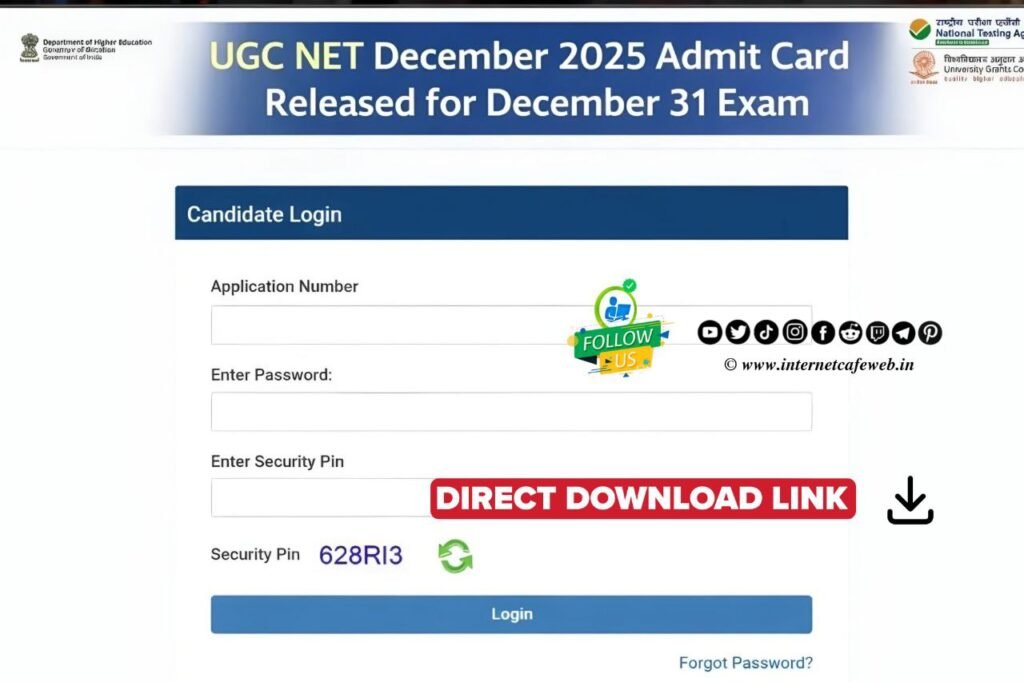
To download your UGC NET admit card, you need to visit the official National Testing Agency (NTA) portal. For the current December 2025 cycle, the NTA has officially released the hall tickets for exams starting on December 31, 2025.
Steps to Download Your Admit Card :-
- Visit the Official Website: Go to ugcnet.nta.nic.in.
- Locate the Link: Look for the link titled “Admit Card for UGC-NET December 2025” under the ‘Candidate Activity’ or ‘Latest News’ section.
- Enter Login Credentials: You will be redirected to a login page. Enter the following:
- Application Number
- Date of Birth (or Password, depending on the option chosen)
- Security Pin (the captcha shown on the screen).
- Submit and View: Click the “Submit” button. Your admit card will appear on the screen.
- Download and Print: Save the admit card as a PDF and take a clear printout on an A4-sized sheet.
Key Things to Check on Your Admit Card
Once you download it, verify that the following details are correct: - Personal Info: Your name, photograph, and signature.
- Exam Details: The exact address of your Exam Centre, the Date, and the Shift Timing (Shift 1: 9 AM–12 PM; Shift 2: 3 PM–6 PM).
- Reporting Time: Check the “Gate Closing Time” to ensure you arrive well in advance.
What to Carry to the Exam Centre
You must carry these items; otherwise, entry will be denied: - Printed Admit Card: Preferably in color, though B&W is usually accepted if clear.
- Original Photo ID: Aadhaar Card, PAN Card, Voter ID, or Passport (photocopies are not allowed).
- Passport Photo: One additional photograph (same as the one on the application) to be pasted on the attendance sheet.

Note: If you are appearing for an exam date later than December 31, and your admit card isn’t visible yet, don’t worry. The NTA often releases admit cards in phases, usually 4 days before each specific exam date.